





A guide to YouTube for real estate agents


Video is an essential and growing part of every estate agent’s marketing toolkit, helping you raise awareness of your business, generate leads and convert them into paying customers. So, is YouTube for real estate agents?
There are many reasons why video works. It allows you to ‘show, not tell’ – always a more powerful means of communicating. It is also attention grabbing – vital in a world where the average adult’s attention span is thought to be around eight seconds … and shrinking.
If you’re still not keen on employing video in your real estate business, just think about these stats …

When we’re talking about using video, there is one platform which towers above them all – YouTube. You may think of it as the place to watch capers with cats or shaky DIY advice, but there’s so much more to it than that.
YouTube sits just behind Facebook, Instagram and WhatsApp by raw user numbers, but it leads on watch time, with users spending more time on YouTube each month than on almost any other platform.
For anyone new to using video, the basics are easy to grasp, and you already have the tools you need at your disposal – in the form of your smartphone.
Read on for our step-by-step guide to a successful real estate marketing through your YouTube channel.
If you don’t already have a YouTube account, you need to set one up, either by signing in to an existing Google account or creating one. Sign up for a YouTube channel and you’re ready to start filming and uploading.
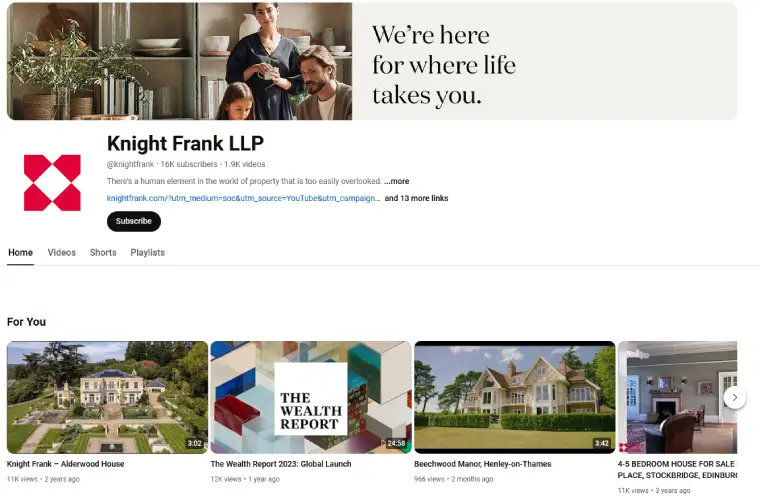
Before you start uploading videos, you need to brand your YouTube channel. This means making sure it features your logo and other brand architecture – your corporate colours and fonts and your boilerplate – the written copy you use to describe yourself and what makes you unique.
Find a high–quality, inspiring image for your landing page and include links to all your social media channels. It is also worth investing in your homepage video which tells your story and provides a strong introduction to your brand.
See this example from Knight Frank:
TIP: Subscribe to our YouTube channel to ensure you don’t miss any of our video marketing tips.
Just as with your blog, newsletter or any other regular audience communication, you need to have a future plan in place for your videos. It should be a varied programme too – listings videos are great, but think about different formats which will really engage your potential customers.
Create a forward plan – a basic spreadsheet will do – and begin populating it with your ideas and how you will share them, whether through your email newsletters or social media accounts. This will help you stick to a schedule and be consistent in your video creation – rather than letting your YouTube channel lie unpopulated and unloved after an initial burst of energy.
As we’ve said, it’s important to produce different types of video and to tailor them to the audiences you are trying to attract. You may want to use ‘how to’ videos – demonstrating how to stage a home to sell, in a quirky or interesting way, to attract more sellers or a tour of a property to demonstrate what new landlords need to know about gas safety – if this group is your target.
Here are a few examples:
You might want to include interviews with experts – about the state of the housing market locally, to get you known as an authority, or light-hearted meet–the–team films to show the human side of your agency.
Watch these market update samples
Or see how these agents add personality to their brand:
It’s worth playing with different formats at first. Shoot films of various lengths – 30 seconds to three minutes and indoors v outdoors. Look at your stats for each video to get a sense of what plays well with your audience.
Shorts now sit alongside long-form video as one of the main ways people discover new channels on YouTube. Quick property highlights, one local market fact, or a 30-second “what buyers ask us most” clip all work well in this format. They’re also a low-effort way to repurpose footage you’ve already shot for a longer listing video or market update.
Search engine optimisation or SEO doesn’t stop with your estate agency website. If you want your films to be found on Google, you need to be just as careful in identifying the right keywords for the message behind your videos and to incorporate them in the meta descriptions and tags.
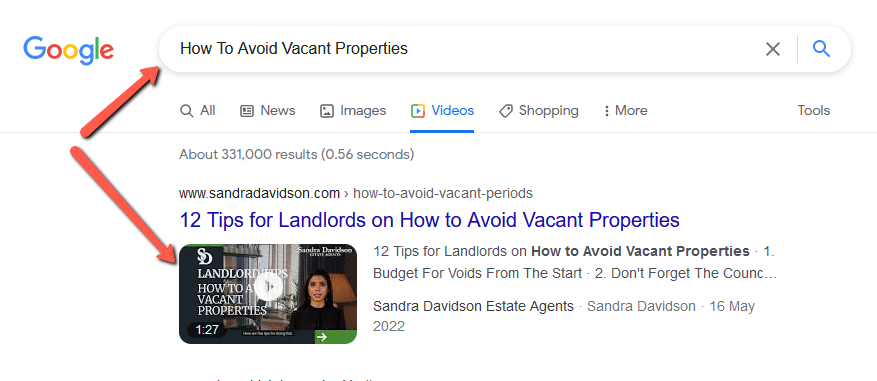
Here is an example of a video we created using AI. If you search in Google: How Do You Get Landlords for your Letting Agency you will find that our blog is ranking on page 1, but in addition, our video also ranks if you search for the same phrase in YouTube directly.
Here is a link to our blog if you want to learn how to attract more landlords via digital marketing.
Google ‘How To Avoid Vacant Properties‘ and you will find the video ranking under the ‘Videos’ tab as well as the ‘all’ tab. This shows the power of video when it comes to ranking.
It’s likely that the vast majority of your viewers will be watching on a mobile phone or tablet so make sure your films work well in these formats. Shoot in the best available resolution for a high–quality result.
Keep a close eye on how your videos perform using YouTube’s own analytics dashboard. This will help you identify how the films are doing in terms of engagement – number of views, comments and clicks. Go beyond these basic metrics too, by looking at your other data, such as for leads, valuations or new landlord instructions, to see whether your calls to action have made an impact.
By understanding which videos have gone down well, and which haven’t performed, you can refine your estate agent YouTube channel and know which techniques to use again
We’ve said that it’s important to look beyond listings videos when pulling together your schedule. However, there is no denying that this type of film is important when it comes to selling houses.
Before you start shooting listings videos, do your research. Look carefully at how other estate agents do it – particularly large chains with the budget to match. Think about what works and what you can use for inspiration. Remember that you don’t necessarily need expensive kit. Good listings videos can be created with a smartphone – though it may be worth investing in a tripod and some lights.
Watch this example for more about virtual tours:
You can commission a professional to edit your videos, or have a go with iMovie for Mac, Camtasia Studio for PC or other editing software – these are generally quite intuitive to use, and do give professional results.
Live streaming might sound daunting but it’s a great way of showing your human side and engaging your audience. Use Facebook or Instagram Live on your phone to create an impromptu video tour of your local area, or a home new to the market that you’re showcasing. The aim of these films is to create something spontaneous and immediate, so you don’t need to worry about production values.
Once you have made a Facebook Live film, you can edit it and share it through your YouTube channel.
Interview your own experts or local influencers, business owners, even celebrities about a pressing subject for your area – on anything from tips for newcomers to house price predictions. Edit the footage and push the film out through your channels. The great thing about bringing in external speakers is that they can share your content through their own networks too.
An example of the video interview …
Or you might offer webinars with advice about a process and invite questions.
Here is an example of an FAQ style video
Short of recommendations from family and friends, online reviews and testimonials are the best evidence for new customers that you will do a great job. If you know a client really rates the service you’ve given, ask them to record a message for your YouTube channel – seeing a real person talk about their experience with your agency really can help convince that wavering lead.
Once you’ve got your channel up and running, there are plenty of opportunities for using your content to attract and convert more leads. Video remarketing, for example, allows you to turn your YouTube videos into ads, targeted at niche audiences. Text overlays can be produced too, to place calls to action over your videos at crucial points to link viewers back to your website.
We’ve known for a while that video is the way forward when it comes to estate agent marketing, but its dominance is growing all the time, as more of the buying, selling and letting process happens online.
The good news is, that setting up your own real estate agent YouTube channel and shooting and editing footage is easier than you might think. Your estate agency might not be the next overnight YouTube sensation. But do your research, planning and practice and you’ll soon be crafting some pretty decent three-minute features for a burgeoning fanbase.
Consistency matters more than volume. Posting one well-planned video a week is far more effective than an initial burst of content followed by silence. Using a simple forward plan, similar to a content calendar, helps agents stay consistent and avoid an unpopulated channel.
No. A smartphone is enough to get started, and many successful listings videos are shot this way. A tripod and some basic lighting are worthwhile low-cost additions, but expensive camera equipment isn’t necessary to produce professional-looking results.
A mix works best. Listings videos are essential, but channels that also include market update videos, educational content for landlords or buyers, meet-the-team films and client testimonials tend to build a stronger, more engaged audience over time.
YouTube videos can rank both in YouTube’s own search results and directly within Google search results, sometimes appearing in the main results alongside written content. Optimising video titles, descriptions and tags with the same keyword research used for website SEO significantly improves the chances of being found.
Yes. Shorts have become an important way for new viewers to discover a channel, alongside traditional long-form videos. Repurposing short clips from listings videos or market updates into Shorts is a low-effort way to reach a wider audience without creating entirely new content.








"*" indicates required fields